Choosing the Right Icon Set for Your Project: Evaluating the Fruits Outline Icon Pack
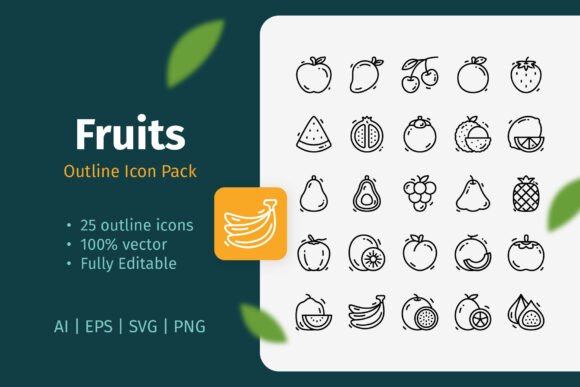
Visual communication hinges on clarity and consistency. When a project requires representing fruits—whether for a health app, a recipe blog, a grocery delivery service, or educational material—a well-designed icon pack can be a foundational asset. The Fruits Outline Icon Pack, comprising 25 distinct icons, presents itself as a potential solution. Its description emphasizes a simple, clean outline design and versatility across digital and print mediums. Evaluating such a resource requires moving beyond its listed features to consider how its specific characteristics align with common project needs, stylistic preferences, and technical workflows.
Understanding the Core Characteristics
At its essence, this pack offers 25 vector-based icons of various fruits, rendered in an outline style. The "outline" designation is key; it means the icons are composed primarily of strokes or lines defining the shape, rather than filled, solid-color silhouettes or detailed, shaded illustrations. This creates a lightweight, minimalist aesthetic. The promise of easy editing—resizing, color changes, stroke weight adjustment—is tied to the provided vector file formats (AI, EPS, SVG). Vector graphics are mathematically defined, allowing lossless scaling, which is a significant advantage over fixed-resolution PNG files when adaptability is required.
Where This Pack Stands Against Common Alternatives
When sourcing icons, designers and content creators typically weigh several broad categories of options. Comparing the Fruits Outline Icon Pack against these categories illuminates its potential fit.
Freestyle Illustration vs. Cohesive Packs
One alternative is commissioning custom illustrations or drawing icons individually. This offers unlimited creative control but demands significant time and skill. The Fruits Outline Icon Pack provides a pre-made, cohesive set where stylistic consistency across all 25 items is guaranteed. This uniformity is vital for professional-looking interfaces and documents where every visual element must feel part of a unified system.
Detailed vs. Minimalist Styles
Icon styles range from highly detailed, photorealistic icons to flat, solid-color icons, and then to the outline style offered here. Detailed icons can be visually rich but may clutter a clean layout and scale poorly to small sizes. Solid flat icons are immensely popular in UI design for their bold simplicity. The outline style of this pack occupies a middle ground; it is less visually dominant than a solid icon, offering a more subtle, refined touch. This can be advantageous when icons need to complement text without overpowering it, or when a light, airy aesthetic is desired.
Free vs. Premium Resources
Numerous free fruit icons exist online, often in PNG format or as part of larger, inconsistently styled libraries. Their quality and license terms can be unpredictable. A focused pack like this, assuming it is a premium product, typically invests in deliberate design and clear commercial licensing, which is crucial for professional projects. The value proposition centers on reliability, curated quality, and the included editable source files.
Primary Strengths and Ideal Use Cases
The strengths of the Fruits Outline Icon Pack become apparent in specific scenarios.
Multi-Platform Projects: Its inclusion of AI, EPS, SVG, and PNG files directly supports workflows spanning print and digital. An SVG file can be used for a website icon, the same icon from the EPS file can be placed in a printed flyer, and the AI source file allows a designer to tweak the stroke color to match a brand palette exactly. This format flexibility is a core benefit for projects with diverse output requirements.
Brand Integration and Customization: The editable vector nature is its most powerful technical feature. Unlike a static PNG, these icons can be seamlessly adapted. Changing the stroke color to a specific brand hex code is trivial in Illustrator. Adjusting stroke weight can make the icons appear softer (thinner stroke) or more assertive (thicker stroke), allowing them to harmonize with the visual weight of accompanying typography and other elements.
Contexts Where Subtlety is Key: The clean outline design is not the most attention-grabbing style. Therefore, its best-fit applications are often where visual hierarchy prioritizes other content. In an infographic dense with data and text, these icons can serve as elegant, unobtrusive markers. In a mobile app with a busy interface, they can function as clear but quiet navigational cues. For book illustrations or educational worksheets aiming for a crisp, non-distracting look, this style aligns well.
Realistic Application Examples
- A nutritionist creating a series of social media banners on "Vitamin-Rich Fruits" could use the pack's PNG files for quick placement in a template, ensuring each post has a consistent visual marker.
- A developer building a smoothie recipe app could import the SVG icons into the codebase, allowing the icons to scale perfectly on any screen and potentially be animated via CSS.
- A publisher designing a children's fruit identification book could use the EPS files in InDesign, thickening the stroke weight slightly for a more durable print appearance.
Considerations, Tradeoffs, and Potential Limitations
While the pack has clear advantages, a balanced evaluation requires acknowledging its constraints and the situations where it might not be the optimal choice.
Scope of Content: The pack contains 25 fruits. For a project requiring an extensive, exhaustive range of fruits—including exotic or less common varieties—this limited set may fall short. It functions as a solid foundation for common fruits (apple, banana, orange, etc.) but cannot cover every possible need. Users must verify the specific fruits included match their project's requirements.
Stylistic Commitment: The outline style is a deliberate aesthetic choice. If a project's overall design language leans towards bold, colorful, solid shapes, or requires icons with filled areas for quick color-coding, this pack's style may feel incongruent. Integrating outline icons into such a design would require additional adaptation, like placing them within solid-colored circles, which adds work.
Dependency on Vector Software: The full benefit of customization ("change color, edit stroke weight") is only accessible to users with vector software like Adobe Illustrator, Affinity Designer, or similar competent tools. A user who only works with basic image editors or relies solely on PNGs will not tap into the pack's core versatility. The PNGs provided are a fallback, but they are static.
Making an Informed Decision: Key Factors to Weigh
Deciding if the Fruits Outline Icon Pack is the right resource involves answering a few practical questions about your specific situation.
- Format Needs: Does your project span both digital (web, app) and print (flyer, poster) mediums? The multi-format inclusion is a strong point if so.
- Customization Level Required: Must the icons exactly match a strict brand color scheme or adjust to fit different layout contexts? If yes, the vector source files are essential.
- Design Style Alignment: Does the minimalist, outline aesthetic complement your existing design mockups or brand guidelines? Preview the icons against your background colors and layouts.
- Icon Quantity and Variety: Are the 25 fruits offered sufficient for your current and foreseeable future needs?
- Tool Access: Do you or your team have the vector editing software (and basic skill) to utilize the AI, EPS, or SVG files effectively?
When Another Option Might Be Necessary
Based on these factors, it becomes clear where this pack might not fit. If your project demands filled-color icons for a vibrant, high-impact interface, a solid-style icon pack would be more suitable. If you need icons for hundreds of specific produce items beyond common fruits, a more extensive library or a custom illustration approach is warranted. Similarly, if your workflow is entirely based on simple drag-and-drop of PNGs into tools like Canva or basic PowerPoint, and you have no need for customization, the premium vector features of this pack may represent an unused capability, making a simpler, cheaper PNG-only set a viable alternative.
The Role of Cohesion and Professional Polish
Ultimately, the value of a curated pack like the Fruits Outline Icon Pack often transcends the individual icons. It provides a system. In professional design, consistency is a pillar of quality. Using a haphazard collection of fruit icons sourced from different places can lead to uneven line weights, mismatched artistic interpretations, and a disjointed final product. This pack ensures that every fruit icon shares the same artistic hand, the same level of detail, and the same technical properties. This cohesion saves time in curation and delivers a polished, trustworthy visual experience to the end-user. For projects where that professional polish is a priority—be it a commercial website, a published book, or a client presentation—this systemic benefit can outweigh the limitation of a fixed number of items.
Choosing visual assets is rarely about finding a universally perfect option; it's about finding the most appropriate tool for a specific job. The Fruits Outline Icon Pack, with its clean outline design, multi-format files, and editable vector foundation, is a robust tool designed for a particular set of jobs. Its suitability hinges on the alignment between its characteristics—minimalist style, curated variety, and technical flexibility—and the concrete demands of your project's medium, design language, and workflow. By evaluating these factors against the common alternatives and tradeoffs, you can determine whether this pack serves as a fitting solution or if your search for the right fruit icon resource needs to continue elsewhere.